A stylized digital render showing two slim rectangular devices, one dark green and one light beige, centered over a futuristic circuit-board style interface background with lines, text blocks, and schematic panels.

Build a Clearer Django Project From the First Idea

View Course Tiers
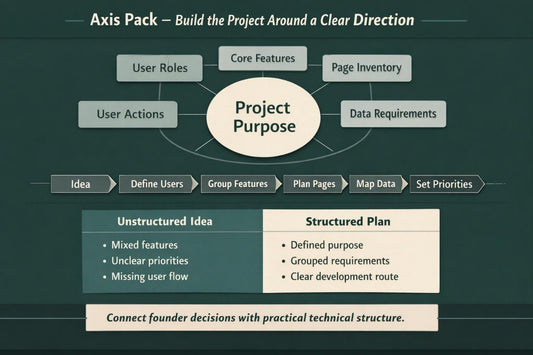
  • A black tablet device angled on a black surface, displaying a digital design template titled 'Axis Pack' with dark green, white, and teal geometric graphics.
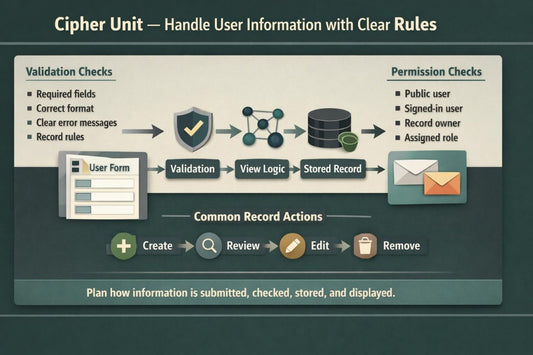
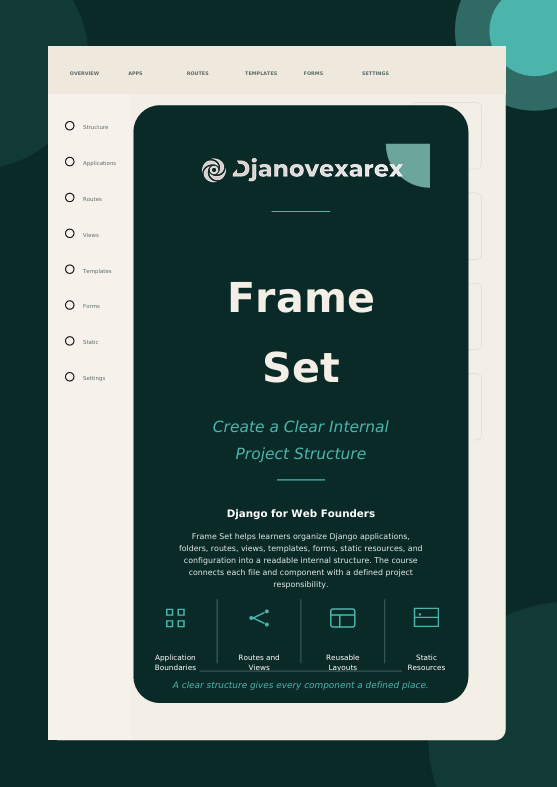
  • A person's hands typing on a dark gray laptop keyboard, with the screen displaying a digital course or document titled 'Cipher Unit'.
  • A hand holding a black smartphone that displays a digital guide titled 'Halo Guide' on its screen against a plain white background.

Turning Founder Ideas Into Structured Web Builds

Our mission is to help web founders develop Django knowledge, organize project requirements, and understand how features, data, pages, and users connect. Each course provides detailed guidance intended to support thoughtful planning and steady skill development.

Built From a Founder’s Point of View

Djanovexarex began after our team noticed that many web founders had thoughtful ideas but lacked a clear way to connect them with Django development. We created a structured course route that explains project planning, application components, user workflows, and technical decisions in practical language.

  • Django Systems Planner - David Obrien

    David Obrien

    Django Systems Planner
    David turns broad web ideas into structured Django project outlines. He documents user roles, feature groups, page flows, and data requirements. His planning helps founders discuss technical decisions with greater clarity.

  •  Django Interface Planner - Kinsley Avila

    Kinsley Avila

    Django Interface Planner

    Kinsley plans layouts, form states, dashboards, and user navigation for Django applications. She connects interface decisions with views, templates, and stored information. Her process keeps each page focused on a defined user action.

  • Web Workflow Developer - Sebastian Vega

    Sebastian Vega

    Web Workflow Developer

    Sebastian builds connected and structured workflows for forms, dashboards, records, and user actions. He reviews how each page leads into the next project step. His approach supports readable logic and consistent application behavior.

  • An isometric layered diagram showing stacked rectangular blocks in shades of dark green, teal, gray, cream, black, and white, with small connected square nodes on both sides, on a light gray background.

    Structured Planning

    Structured exercises help learners define project goals, user roles, feature priorities, and development stages before broader work begins.

  • A minimalist flat vector illustration of a computer network or database diagram, featuring connected devices in shades of teal, dark green, and dark gray on a solid white background.

    Clear Knowledge

    Each tier links concepts with practical founder decisions, helping learners understand how technical components work together.

  • A minimalist vector illustration of three dark teal database server stacks connected by lines and dots, arranged in a triangular layout on a solid white background.

    Practical Materials

    Guided worksheets, diagrams, examples, and review activities help learners apply course topics to realistic web project ideas.

  • A minimalist vector icon showing a central human figure surrounded by four rounded square panels in dark green, sage green, beige, and charcoal, each with curved arrows indicating a circular workflow or process.

    Steady Progress

    The course route introduces topics gradually, allowing learners to develop knowledge through connected learning stages.

30-days refund guarantee

Try the course completely risk-free. We want you to be fully confident in your investment, so if you're not satisfied with the content for any reason, you can get a full refund. No questions asked, and no hoops to jump through. Refund requests may be submitted within 30 days of purchase in accordance with our Refund Policy.

Begin With a Free Starting Module

Explore an introductory Djanovexarex module created for learners who want to understand the foundations of Django for web projects. The free materials explain how project purpose, applications, models, routes, views, and templates connect. Guided activities help learners organize an initial web idea and prepare a simple project outline. This starting module also provides a clear introduction to the teaching style used throughout the wider course collection.

  • Natalia Oliynyk

    Natalia Oliynyk

    Natalia started with detailed page sketches for a founder-led web service but had not yet defined user roles, permissions, or stored information. The planning exercises helped her connect interface ideas with data requirements and project behavior.

    “The course helped me look beyond the page design and think more carefully about users, records, and permissions.”

  • Molly Quinn

    Molly Quinn

    Molly came with an existing Django project that had repeated templates, crowded views, and limited internal documentation. The review checklists and refinement sections helped her identify which areas needed clearer organization and written notes.

    “I appreciated that the materials focused on reviewing one area at a time instead of changing everything at once.”

Step Inside the Course Structure

Djanovexarex courses follow a structured route through Django planning, application organization, data handling, user workflows, testing, and release preparation. Each tier introduces focused topics supported by practical examples, guided exercises, diagrams, and review materials. Learners can compare the course levels and choose the stage that reflects their current knowledge and project needs. Select “Preview Courses” to review the curriculum, included materials, and learning focus of each tier.

  • GitHub logo with a black circle and white cat-like face design
  • LinkedIn logo on a white background
  • Black circle with a white letter 'M' in the center